So you want to use your iPad a whiteboard in a Teams meeting? Well this is one way in which you can do this easily. You will need an iPad (obviously), a whiteboard or drawing app and it helps to have another device (main computer) to interact with the meeting as well as using the iPad to draw from.
This post came about after seeing this tweet on the Twitter from Charles Knight.
Is there an easy way to use an ipad as a whiteboard in say teams? Because it would be handy to have a separate device like that…
It got me thinking about whether this was possible, but also how you would do it. So I quickly tried it out and it worked fine. I did tweet a response, but have now written it up as a blog post so others can refer to it (and I can remind myself how to do it as well).
Though you can screenshare direct from the iPad, once you are screen sharing on the iPad, you can’t see the chat or other members on the Teams call.
One solution is to join the meeting from both your main computer and your iPad at the same time.
As well as screen sharing you can also share other content or video from your iPad as well.
So on the main computer start or join a Teams meeting.
One of the reasons I have this blog is for my personal benefit, so I can remember when I purchased items of kit, when they broke down and what I replaced them with.
After my current printer, an Epson XP-8500 started having problems, I realised I hadn’t blogged about getting that printer back in September 2018.
I bought the Epson as a replacement for a Canon printer I had, which itself had been a replacement for a wonderful Canon printer, the MP600R, that had lasted ten years….
I bought the Canon MP600R back in 2006. This was a somewhat expensive printer, but it had separate ink cartridges, a scanner, memory card slots (remember those) and could print printable CDs and DVDs.
The scanner was pretty decent, and it could print some excellent colour prints, if you used Canon paper and Canon inks. Compared to modern printers it was quite slow, but speed wasn’t always a key issue for me, picture quality was. I didn’t like the fact that you had to use Canon paper, but it was quite easy to get hold of, at local stationers and Amazon.
I was saddened when the print head failedin May 2016.The cost of repairing the MP600R was prohibitive, I would have been happy to replace the print head, but the cost of a replacement was around £150 and even then I wasn’t sure if it would have fixed the issue. So I recycled the Canon printer and replaced it with the Canon MG7752. I thought at the time that was an excellent replacement for the MP600R and hoped it would last as long as the printer it replaced.
Alas it wasn’t going to be and the MG7752 failed after two years in 2018 (just out of the two year guarantee period). Though I was happy to buy another Canon, in the end we went with the Epson XP-8500 in September 2018, which we got from John Lewis as they offered a two year guarantee and a good price.
Perfect for photography enthusiasts looking for exceptional photo printing and great all-round performance, the Epson Expression Photo XP-8500 will print, scan and copy to a high standard. The XP-8500 uses six individual inks for high quality colour prints, and features a large LCD touch screen and wireless printing functionality for easy use throughout your home. This compact and stylish printer has a small footprint so it’ll fit neatly into your set up.
I much prefer separate inks, as I think they are more economical than purchasing a combined colour ink cartridge. I wanted to print photographs, and also wanted to scan stuff as well. I also liked the fact it was wireless so I could Airprint from the iPad or the iPhone.
I was impressed with the photo printing which was quite fast, yet still excellent quality.
There were a few issues that I didn’t like. Now and again the printer would get lost on the network and you had to go through a process of power cycling the printer, cancelling the print job and printing again.
Over the last few months, I started to have issues with the photo paper feed, so much so that within the last month it stopped working altogether. I followed all the troubleshooting guides, but to no avail. As it was in lockdown, and we still needed to print, I decided to wait, though I did check it was still within the two year guarantee period.
I have been scanning a few photographs and other documents, and noticed that the quality in some areas was quite poor and blurry. It wasn’t the whole image which was blurred, just part of it.
So having a little time I phoned the John Lewis technical support line.
The end result was that due to the age of the printer, I could either have a replacement or a refund. At the time of calling there was very small range of printers in stock. So I initially decided to wait until later, as we could still print to A4, but I wasn’t sure how long that was going to last. In addition if I had refund, we would have to return the printer, so we wouldn’t be able to print. Also I had just forked out for a complete set of replacement inks which was about £90…
Later that day I checked the printer range at John Lewis and was pleasantly surprised to see they must have had new stock come in.
They had the Epson Expression Photo XP-8605 which used the same cartridges as the XP-8500 and looked to be an upgraded version of the printer we had, but in white…
Perfect for photography enthusiasts looking for exceptional photo printing and great all-round performance, the Epson Expression Photo XP-8605 will print, scan and copy to a high standard. The XP-8605 uses six individual inks for high quality colour prints, and features a large LCD touch screen and wireless printing functionality for easy use throughout the home. This compact and stylish printer has a small footprint so it’ll fit neatly into your set up. You can print double-sided onto A4, and with dual paper trays you can feed A4 paper and photo paper at the same time.
To be honest the description and functionality was almost identical.
So I ordered the printer and phoned John Lewis back, who were really helpful. I could drop off the old printer at our local Waitrose and at the same time pick up our new printer.
I was slightly sceptical about ordering virtually the same model, but I wasn’t too sure that if I ordered a Canon, whether I would have the same issues I had with the MG7752.
I think I really miss the reliability of the MP600R.In a similar story, I had in 2011 bought the HP PhotoSmart B110a in the main so I could print direct from my iPad using AirPrint, this was to complement the Canon. However just over a year after purchase and as I replaced the inks, the print head failed.
So here’s hoping that I get some decent life out fo the XP-8605.
A couple of days ago, the IFTTT recipe I used to post native Instagram photos to Twitter stopped working. I used IFTTT as the sharing function on Instagram to Twitter only posted the link, whereas with IFTTT the process posted the full image.
However in the last few days, it has stopped working, and I wasn’t entirely sure why. I checked my IFTTT applet process and saw this.
I recall getting an e-mail from IFTTT, which now I can’t find, but I didn’t think applied to the applet I was using. Well it still may not apply, but I did the following and this appears to have fixed the problem.
What I did was re-authorise IFTTT to access my Instagram account.
Go to this page (ensure you are logged into IFTTT).
With the ongoing threat of the coronavirus and many organisations looking to allow workers to work from home to reduce the threat of infection and transmission of the virus.
I do a fair amount of remote working and location-independent working and am quite happy about doing this, I have been working from home on a regular basis for about the last twenty years. Even so with the possibilities of forced home working to reduce the risk of transmission, this is going to be a different experience to what I am use to. For those who don’t do this oftenor rarely, they may find it challenging.
In this blog post I am going to discuss and reflect on some of the challenges that working from home could entail, in a landscape where lots of people are working from home, schools are closed and there is restrictions on movement and transport. This is not a complete article on home working, more some of the issues I have been thinking about over the last few days on this subject.
Myself, Lawrie and Donna, and did a podcast back in 2016 about location independent working,
The web affords us new ways of working, new opportunities to connect. It furthermore allows for a richer experience of work and life, rather than forcing us to segregate our time from ourselves via physical location, allowing us to choose when and where we are most productive, and how to conserve our face to face energy for those times that truly require it.
In this current landscape of forced home working, the issues we discuss are very relevant, however with the challenges of the coronavirus, it’s not quite the same as it was before and there are some issues you will need to consider in addition to the topics covered in the podcast and the blog post.
Even if you are use to working from home, with coronavirus it won’t be the same as when you have worked from home before.
In Italy they have closed all the schools and colleges, to reduce the risk of transmission. If similar measures are taken in the UK, then you (or your colleagues) will probably be trying to work from home and there will be children at home. Though I work from home a fair bit, during the school holidays I usually go into the office, so I don’t get in the way. You may be lucky and have your own office where you can shut yourself away, but if not you may need to plan how you work around the others in the home. This could mean changing the hours when you work. As result you will also need to consider the times others may be working.
Asynchronous communication may be more effective than trying to find mutually convenient times..
I often use external locations, okay places where I can drink coffee, will these still be open? Will people want to visit them or will they avoid them to ensure less risk of infection? The reason for this is about motivation and productivity, so you will need to think about what you do during a day to keep working effectively, and what you can do instead.
It’s not just a matter of space, there is also the issue of bandwidth. Normally when working from home I have all the bandwidth, but with “forced” home working and schools closed, it won’t be just you wanting to use the internet. You can imagine the increase in demand for streaming services such as Netflix. This also won’t be isolated to your home. Your neighbours may also be working from home, or using the internet so the contention ratio may rise as more people try and use the same data capacity. It won’t just be restricted to home broadband, but also mobile networks. This will have an impact on how you work, if you depend on connectivity. For calls and meetings. You may find asynchronous low bandwidth communication and collaboration tools a better option than the full functionality high bandwidth tools you are use to.
Planning
If you are use to people responding quickly, you may find the delay in their response frustrating, if they are working to different hours or have bandwidth issues. One way to overcome this, is to plan your work to take this into account, be more proactive than reactive when it comes to collaboration and seeking responses. Let people know in advance, when you will be seeking their input or feedback, so they can plan accordingly. We usually work in a manner that our environment allows us to (lean over the desk for a chat or a question), but when it comes to constrained working patterns as may happen with the coronavirus, the way in which you work, will also need to change.
Planning your day and sharing those plans with your colleagues and managers will enable them to plan their days accordingly and then be able to schedule calls and meetings when appropriate and convenient.
Meetings
An online meeting is not the same as a face to face meeting, and though similar there are differences. Chairing online meetings is a skill and they need to be managed effectively. The main challenge is that often the visual cues that are present in a face to face meeting are missing and without these you can cause arguments and frustration. I have found you need to ensure meetings are planned and that when allowing people to talk that this needs to be more structured than in a traditional meeting format. This also needs to be communicated to all people attending the meeting as well.
The work you can do in the office may not be possible to do at home, so when it comes to planning your work, you may need to take that into account. There may also be opportunities for new ways of working and new pieces of work as well.
Tools
There are plenty of articles being posted across the web about the tools that allowfor more effective home working. As mentioned before with the increase in people working from home, will these services be able to cope with the increased demand for these tools? Are there alternatives you can use?
An assumption often made is that people know how to use these tools and how to use them effectively and efficiently, that may not be the case. There is a question of support and training that may need to be put into place to ensure that tools don’t become a barrier to working from home.
People
Finally the human side of working is important. You, your colleagues, your team, are all people.
I found this blog post from Lawrie, Donna and Peter an insightful view about the criss from a human perspective.
Your colleagues may be struggling, they may be anxious, they may have friends or family who are infected with the coronavirus. They may be ill themselves. They may have challenges in finding medicines, food (even loo roll) and this will undoubtedly impact on the way they work and what they can do.
Work is one thing, but at the end of that Teams call, the Yammer post, the e-mail, the Skype conversation, is a human being. In these testing times we shouldn’t forget that we are all human.
Over the last few weeks I have been having an issue with my iPhone 6S Plus and the Three network. Over the last four years I have had very few if any issues with my Three data connection, so it’s weird I am having an issue now.
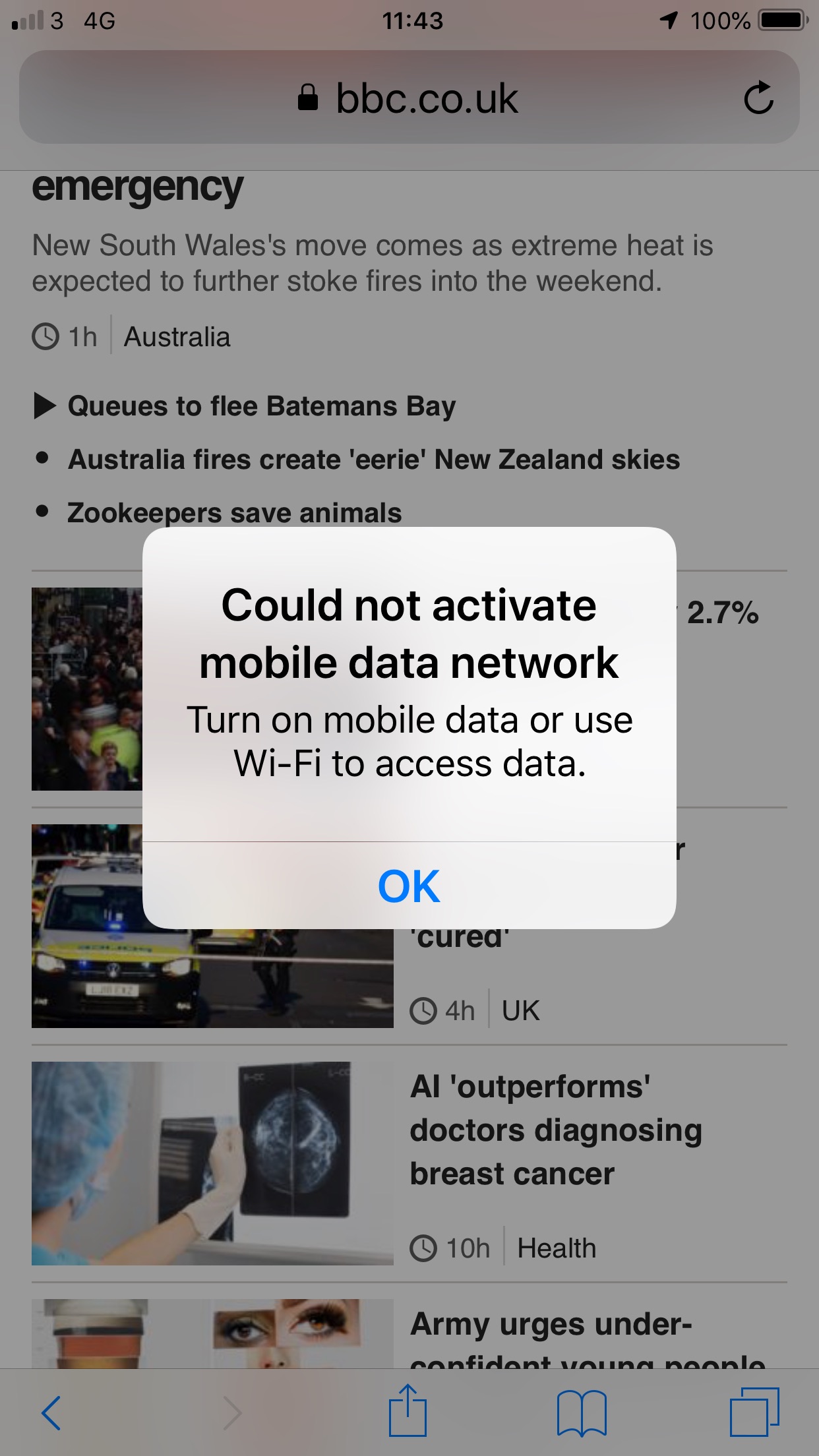
I have been at home on the Wi-Fi, I leave the house and then wherever I am I check the phone as find that it says.
Could not activate mobile data network Turn on mobile data or use Wi-Fi to access data.
This is even with 4G being in the top of the phone. Clicking OK results in no change.
What’s interesting, was that I thought it might be a handset issue, but family (also with Three) are having similar issues with their iPhone 6S and a newer iPhone XS.
At the moment, the solution is to go to airplane mode and then turn that off. At which point all works fine.
It’s not isolated to a single tower either, as it happens locally and further afield.
I don’t have a real solution and it appears from searching online others are having similar issues as well.
The post at number six was from 2012 when my HP Photosmart printer died. My printer is dead! was a sorry tale about how replacing the ink cartridges on the HP B110a resulted it in destroying the print head.
So the most popular post again on the blog was my post about QR codes on chocolate bars, Cadbury QR Coding and Twirling was published in 2015 and was one of many posts I published on the use of QR codes back then.
I have been asked a fair few times about the different podcasts I listen to. I often travel a fair bit for work, so it’s nice to have something to listen to. This series will discuss and review the different podcasts I listen to or have listened to. In a previous blog post I spoke about the why and how I listen to podcasts, now we look at the actual podcasts I listen to.
No Such Thing as a Fish is a weekly British podcast series produced and presented by the researchers behind the BBC Two panel game QI. In it each of the researchers, collectively known as “The QI Elves”, present their favourite fact that they have come across that week. The most regular presenters of the podcast are James Harkin, Andrew Hunter Murray, Anna Ptaszynski and Dan Schreiber, although other QI researchers also make appearances, and there are guest presenters on some episodes.
I have always enjoyed QI on the television, so it was interesting to discover this podcast from the researchers behind the programme.
I don’t recall how I found the podcast, but it’s an interesting podcast full of (quite interesting) facts.
If you are expecting an audio version of QI, then look elsewhere, yes the podcast is full of quirky facts and information, but the format is different to the show. I really like the fact that it is different.
As well as facts, the banter between the hosts is also engaging and amusing. Though there are some reflections on previous episodes, I find that you can dip in and out on the podcast without having to listen to them all.
This is an enjoyable fun podcast, which you may also learn some stuff.
Today the humble text message turns twenty-seven. It was in 1992 that the first text message was sent an engineer from Vodafone, sent the message “Merry Christmas” from a PC to a mobile device using Vodafone’s UK network.
I don’t recall the first text message I sent, but it was one technology that I have never really taken advantage of.
I only really started sending text messages when I got my first iPhone. I think my problem was with predictive text or even understanding texting language. The advantage of the iPhone was a proper keyboard and not needing to try and use a numeric keypad. I could never get my head around the numeric keypad and did like and prefer the qwerty keyboard. Still have that today when people send me SMS texts, sometimes I have no idea what they are trying to say! I know, I know, I am old…
Of course Messages on the iPhone isn’t actually SMS either…
I still use SMS, in the main for receiving updates from the NHS, my dentist and delivery services. I prefer SMS updates as I find that e-mail updates get lost in the volume of e-mail I get. Also SMS self organises on my iPhone and I get very little if any SMS spam.
There are signs from Ofcom that the use of texting has peaked and is on a decline.
In 2012 there were 162billion text messages sent in the UK, in 2018 there were just 74billion text messages sent, that’s a 54% drop. Source,
So Ofcom was right and we have seen a decline.
Are we sending less messages?
Well no not really, what’s also happened in that same time period is a huge increase in the use of tools such as iMessage (or is it Messages) on iOS devices, Facebook Messenger and of course WhatsApp. These services are replacing the need for sending SMS messages for many users.