In an interesting experiment and use of social media, the Greater Manchester Police used Twitter for 24 hours to tweet every incident that they had to deal with.
More from GMP.

tech, news, productivity, views and stuff
In an interesting experiment and use of social media, the Greater Manchester Police used Twitter for 24 hours to tweet every incident that they had to deal with.
More from GMP.
If you have a look at the invite for the 20th…

Have another close look…
Notice how the bottom corners are square and the top are rounded?
Significant?
Photoshop error?
Probably!
Some other thoughts coming from discussions over the tubes.
3D could be coming.
Blu-Ray, though I think not…
Facetime, very likely in my opinion.
I still think touch will be there too.
October 20th sees an Apple event called Back to the Mac.
Now no more details than that.
There are two key clues though in the image.
First it says Mac, this probably means that it is about the Mac and not another iOS device.
Second, peeping behind that apple is a Lion.
Now this means that it is time for Apple to announce their new OS called Lion. Will it be 10.7 or 11.0 well we don’t know. A lot depends on what the big new thing will be.
10.6 was only a slight improvement over 10.5 and to be honest I am using 10.6 on my iMac and 10.5 on a MacBook Pro and I rarely notice the difference. What new stuff could we see in 10.7, no idea.
However if this is 11.0 then could we see the iOS touch interface integrated with the OS X (or is that OS XI) as rumoured earlier this year?
Whatever happens it will be interesting to see what Apple have to say.
At the beginning of September, I wrote:
…my Airport Extreme is becoming less reliable. I am having to reboot it at least once a week now. There is no warning before it goes dodgy.
I said at the time that when I upgraded to FTTC I would probably upgrade the Airport Extreme
I am going to wait before replacing it, as we are getting BT Infinity later this month and I am not sure if I will need a new router. If I do need a specific type of router then I will get a new 802.11n router.
However in the end I found out from BT that I could use my Airport Extreme with FTTC. So before I was upgraded I did update the firmware on my Airport Extreme to firmware 7.4.2

I don’t usually recommend updating your Airport base stations unless there is a security issue, or in my case you are having problems.
Updating the firmware seems to have resolved the issue and I have not had a problem since I updated. However the Airport Express has stopped working properly at least once, though that is much older than the Airport Extreme.
As I have upgraded to FTTC and one of the requirements is that your router supports PPPoE. As a result I have replaced my old aging Netgear ADSL modem router with my Airport Extreme Base Station. I wasn’t able to use the Airport Extreme before as it did not support PPPoA, but as FTTC requires PPPoE I can now use it. As a result, it is a new(ish) router and therefore I anticipated that I would be able to do two things, one is use EyeTV remotely across the internet and two use Back to my Mac.
So what of EyeTV?
Watch, record, and enjoy live TV on your iPhone or iPad via a 3G or Wi-Fi connection. At last, you don‘t have to leave all your great TV shows at home; the EyeTV app puts the power of award-winning EyeTV in the palm of your hand.
The EyeTV app accesses EyeTV running on your Mac at home to deliver these great features to your Apple device:
Watch live TV and change channels anywhere (via a Wi-Fi or 3G connection) Watch your EyeTV recordings Browse the comprehensive Program Guide and view details Start recordings back home on your Mac immediately or schedule them for later View and edit your recording schedules Automatically launch EyeTV on your Mac at home as needed
EyeTV has an iPad and iPhone App which have worked really well on my home network, but so far I have not had any luck accessing it away from home, even though it is correctly configured.
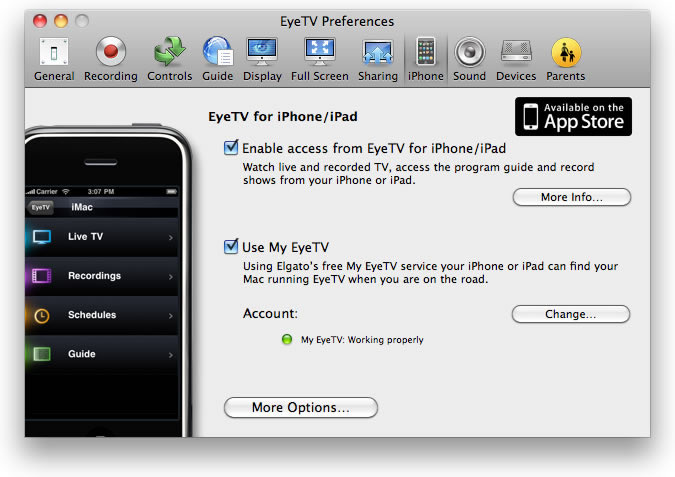
I do believe though this is because of the remote network I was on. I have yet to try on a public wifi network and I suspect I will have better luck then.
As for Back to my Mac, Apple says.
Back to My Mac puts any Mac OS X Leopard- or Snow Leopard-based Mac you use within easy reach. MobileMe finds your remote Mac computers over the Internet and displays them in the Finder on the Mac you’re using. So you can connect from anywhere with just a click. Edit and save documents, open applications, and move folders. With Back to My Mac Screen Sharing, you can control your remote Mac as though you’re sitting in front of it.
Again on my home Mac, everything seems fine.

Well I did try and do this, however I couldn’t get my work Mac to recognise my MobileMe account and again as with EyeTV I believe this is because of the remote network.
So near, yet not quite there.
That nice Stephen Fry who wrote this on the iPhone and nice things about Steve Jobs saying nice things about Windows Phone 7!
Finally had my broadband upgraded to FTTC and I am impressed.
With 40Mb down and 10Mb up this is significantly faster than the 1.3 down and 0.6 up I had before.
It has already changed how I use the internet, whereas before I would probably not consider downloading a film from iTunes during the day, as it would soak up my bandwidth and would take hours to download; now it takes under five minutes to download! No problems with downloading large files and updates now.
The other key advantage is streaming video, which was almost pointless before due to buffering, and like downloading, previous streaming would soak up my bandwidth, having 40Mb down means I can stream and do other stuff at the same time.
My only concern is that all this speed I will probably exceed my bandwidth quite easily…
BBC News reports on new features on Facebook.
Facebook has introduced a raft of features aimed at giving users more control over their personal data.
A groups feature will allow users to specify circles of friends with whom they want to share different data.
For the first time, users will also be able to download all the data they have uploaded onto the site.
Daily Telegraph reports on security issues over Facebook Places.
Security officials have warned members of the armed forces that geo-location services, such as Facebook Places, could be used by terrorists to track potential targets.
There are real security issues as far as the MoD are concerned, but I wonder if many learners have actually thought about the implications of “shouting” where they are all the time.
According to the original announcement from Apple we should see the Apple TV before the end of September. The last time I went to my local Apple store they still had the old model and no news on the new one (nothing new there then).
Originally I was quite excited about it and nearly pre-ordered….
However since then I have become slightly less keen.
Will still probably buy one.