Firmware 2.2 on iPod touch stops BBC iPlayer – Update

Well a couple of interesting bits of information have come my way since I posted yesterday about how firmware 2.2 on the iPod touch stops the BBC iPlayer from working.

Though Apple updated the firmware, and the BBC did not change anything, it is looking like the BBC’s platform/connection detection code is coming to the wrong conclusion.

That code according to FrustratedByiPlayer on the BBC Message Boards, looks like this.

case ‘STATE_CONNECTION_TYPE’:

// hack for demi – in case demi variables mysteriously disappear as they are prone to do.
if(data.response.DEMI_ERROR_FAILOVER === ‘true’ && _failOverCount < 3) {
_failOverCount++;
return device.connectionType();
}
else if(data.response.DEMI_ERROR_FAILOVER === ‘true’) {
_self.setState(“STATE_MEDIA_UNAVAILABLE”);
return;
};

if(data.response.ALLOWED_NETWORK === ‘true’ && data.response.IP_IS_UK_COMBINED === ‘yes’) {
_state = ‘STATE_IS_MEDIA_AVAILABLE’;
_mediaAssetProfile = data.response[_serviceType.toUpperCase() + ‘_MEDIA_ASSET_PROFILE’];
_self.setMediaAssetProfile(_mediaAssetProfile);
return mediaSelector.mtis(_versionPid, _mediaAssetProfile);
}
else if(data.response.ALLOWED_NETWORK === ‘true’) {
_state = ‘STATE_OUTSIDE_UK’;
_self.setState(_state);
return;
}
else {
_state = ‘STATE_NON_WIFI’;
_self.setState(_state);
return;
};

It is the _state = ‘STATE_NON_WIFI’; which is the result of the detection code failing to correctly recognise the iPod touch as a wireless device and thinking it is a 3G iPhone.

Note that the 3G iPhone on wifi works fine!

By adding the correct device to the detection code by the BBC web development team this should solve the issue.

Lakeuk on the BBC boards has been able to recreate the error on Firefox.

User Agent for FW 2.1.1 works:-

Mozilla/5.0 (iPod; U; CPU iPhone OS 2_1_1 like Mac OS X; en-us) AppleWebKit/525.18.1 (KHTML, like Gecko) Version/3.1.1 Mobile/5F138 Safari/525.20

User Agent for FW 2.2 gives the error everyone is getting:-

Mozilla/5.0 (iPod; U; CPU iPhone OS 2_2 like Mac OS X; en) AppleWebKit/525.18.1 (KHTML, like Gecko) Version/3.1.1 Mobile/5G77a Safari/525.20

According to the BBC Message boards this message has been passed onto the BBC team.

Firmware 2.2 on iPod touch stops BBC iPlayer

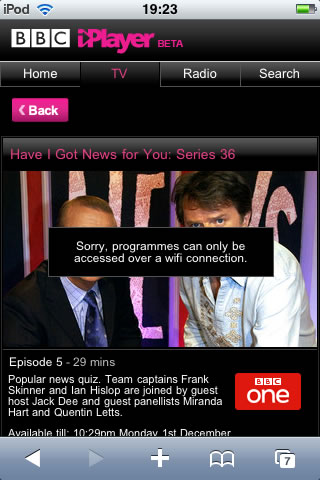
BBC iPlayer on the iPod touch is one of the best things that arrived on my iPod touch. However bad news if you upgrade to firmware 2.2, you won’t be able to access BBC iPlayer on your iPod touch!

When you try you get the following error message.

iplayerbbcerror100

Sorry, programmes can only be accessed over a wifi connection.

Hello!

The iPod touch only does wifi!

It would appear that the fault lies with both Apple and the BBC.

The BBC use a browser detection script which identifies that the user is using an Apple iPhone or an iPod touch. I would assume before firmware 2.2 that the browser identifier used by the iPhone and the iPod touch were different when on wifi compared to when the iPhone was using 3G or Edge.

With firmware 2.2 it would appear that the BBC script incorrectly identifies the wifi iPod touch as a 3G iPhone. Now this could be because of a change by Apple on the mobile version of Safari.

So alas at the moment we have no way of watching BBC iPlayer on an updated iPod touch!

JoikuSpotting

I really do like the iPod touch, the interface, the browsing experience, the video playback, the different applications now available.

Of course to get full functionality you need to be in the vicinity of a wireless hotspot. You can’t (for obvious reasons) use a 3G dongle and without bluetooth or the ability to connect a cable you can’t use a tethered mobile phone.

Now I know what you’re saying, get a 3G iPhone, well yes, that is all well and good, but three things are stopping me, one I already have a Nokia N95 which does what I need (well the typing is nowhere as near as nice as on the iPod touch), secondly I am well into a long contract too with T-Mobile. Thirdly, I quite fancy upgrading to the Google G1 phone.

So I was quite interested in trying out JoikuSpot. What JoikuSpot does is basically turn your 3G wifi mobile phone into a wireless hotspot.

So the Nokia N95 connects to the internet via the 3G network and then allows wifi clients connect to it via the 802.11 wifi.

It works very well and is in my opinion very clever.

The free version is limited and doesn’t allow you to do e-mail which is a pity, so I will probably upgrade to the pro version.

Google announce the G1 Google Phone

Today Google announced the G1 Google Phone. The good news is that it will be available in the UK from T-Mobile in time for Christmas. I had anticipated that like many other devices, that the G1 Google Phone would be available in the USA first and a few months (or even a year later) it would appear here in the UK. If you recall Apple’s iPhone arrived in the US in June 2007 and did not appear in the UK until November!  However it is looking like that it will be available in the UK within weeks (if not at the same time) as the US version.

Not totally impressed with the look of the device, it does not exude style and class like the iPhone, but it does come with a touch screen and I am sure the qwerty keyboard will be useful for many.

Incidently why is it that I need to stop and think about how to spell qwerty?

I do have a T-Mobile phone and I hope that I might be able to upgrade to the G1 when it arrives in the UK later this year.

App issues

It would appear that upgrading Apps on the iPhone (and in my case the iPod touch) is not as simple and straightforward as Apple would lead you to believe.

Over the internet tubes there are quite a few reports about using the in-built App store on the device itself to update doesn’t always work as expected.

Personally I have had a similar issue myself when upgrading the iDrops game on my iPod so much so I had to follow the advice given on the iDrops website.

Following the release of v1.2 of iDrops, a lot of users have reported problems with Apple’s less-than-ideal application update process in iTunes.

To help with the upgrade process, we would recommend trying to uninstall iDrops, and then installing it again (this is easy to do).

You can do this in iTunes if you manage your installed applications manually. Uncheck the iDrops application, and sync with your iPod or iPhone. iDrops will be removed from your device. Check the iDrops application again, and sync with the device again. iDrops will be re-installed. It should now launch with no problems.

So though it is possible to add and update apps on the fly, starting to look like you should avoid doing it on the iPod and if you can add and remove Apps on the computer and then sync to your iPod touch or iPhone.

Weird iPhone Error

I got the following weird iPhone error in iTunes on my iMac.

Weird iPhone Error

It’s weird (very weird) as I don’t have an iPhone and have never connected an iPhone to my iMac. I have connected an iPod touch, so that might be it!

Weird.

Evernote on the iPod touch

43 Folders has posted a short review of the Evernote application for the iPhone (or the iPod touch).

I need to do a full post on Evernote here some time soon, because it really is a nifty little application for collecting, storing, and organizing practically any kind of information you can throw at it. The iPhone version is a stripped-down, all-business version of the app that will scratch an itch for Evernote fans who are fatigued by having to email everything to the mothership.

Having used it myself, it works quite well.

 Evernote on the iPod touch

Evernoted

I have been using Evernote for a while now.

Evernote allows you to easily capture information in any environment using whatever device or platform you find most convenient, and makes this information accessible and searchable at any time, from anywhere.

Now what I like about Evernote, is not only can you use it online from any web browser, they also have clients for OS X and Windows. If you have a Tablet PC you can even use your “Pen” to make notes too.

They also have a Windows Mobile client and one should also be available for the iPhone (and so the iPod touch) soon.

There is this video which helps explain things a little better.

Evernote was until yesterday an invite only site, it is now in public beta so anyone can now sign up.

Find out more.

iPhone SDK

iPhone

Took the time (and the bandwidth) yesterday to download the iPhone SDK (eighth beta), all 1.25GB of it.

The eighth beta version of the iPhone SDK includes Xcode IDE, iPhone Simulator with Open GL ES support, Interface Builder, Instruments, frameworks and samples, compilers, and Shark analysis tool.

I have not installed it yet, in the main as I am still running Tiger on my iMac, so I need to connect up an external drive with Leopard on it.

Download it.