
Well it worked this time!

In a recent blog post I talked about the problem I had with my Apple Lightning Digital AV Adapter.

I recently connected my iPhone to a Philips TV in a hotel room and attempted to play a TV show from Amazon Prime. The result was a stuttering video which was unwatchable.

I have an Apple Lightning Digital AV Adapter. As well as using it for presentations, I also bought it so I could connect my iPhone to a TV so I can watch video from services such as Netflix, iPlayer, and Amazon Prime.
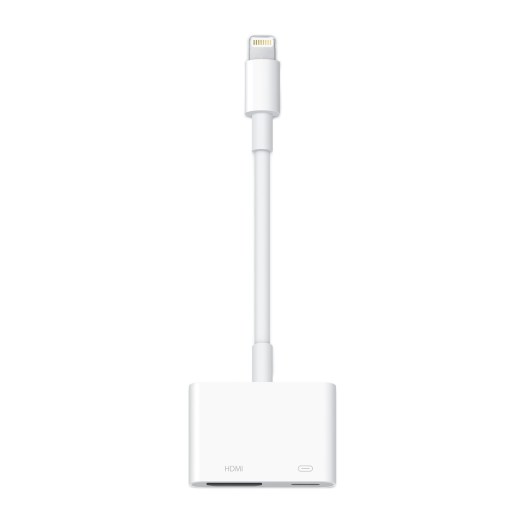
Lightning Digital AV Adapter

According to the description on the Apple website this is what it does.

Use the Lightning Digital AV Adapter with your iPhone, iPad, or iPod with Lightning connector. The Lightning Digital AV Adapter supports mirroring of what is displayed on your device screen — including apps, presentations, websites, slideshows, and more — to your HDMI-equipped TV, display, projector, or other compatible display in up to 1080p HD.

Well for that purpose it does what it says on the tin.

The page also says.

It also outputs video content — movies, TV shows, captured video — to your big screen in up to 1080p HD. Simply attach the Lightning Digital AV Adapter to the Lightning connector on your device and then to your TV or projector via an HDMI cable.

Well yes, that is what it says, my experience is that this experience is less consistent.

So I was a little surprised when staying in a different hotel (same chain as it happens) and connected my iPhone to the Philips TV in the room and watched a programme on Disney+ and it worked just fine and as expected.

Checking back on my last experience, in the other hotel I was trying to play Amazon Prime, I wonder if that was the difference. I didn’t do any testing as I wanted to watch television. Next time I will do some testing.

My Photo Stream will be shut down on 26 July

My Photo Stream

I received an email from Apple about My Photo Stream closing down.

My Photo Stream is scheduled to be shut down on 26 July, 2023. The photos in My Photo Stream are already stored on at least one of your devices, so as long as you have the device with your originals, you will not lose any photos as part of this process. If a photo you want is not already in your library on a particular iPhone, iPad or Mac, make sure you save it to your library on that device. For more information on this transition and instructions on how to download photos from My Photo Stream, read Information about the My Photo Stream shutdown.

I really liked My Photo Stream. It made my blogging and writing workflow so much easier. I would take a photo on my phone and then using My Photo Stream I would be able to use the photo on my iPad or my Mac.

Sometimes I would load photographs from my Canon DSLR onto my iMac, then be able to use those photographs on my MacBook.

Now according to Apple the solution is to move to iCloud Photos.

Moving forward, iCloud Photos is the best way to keep the photos and videos you take up to date across all your devices and safely stored in iCloud.

The main reason I’ve not done this before, is partly as My Photo Stream worked, and I would need to upgrade to iCloud+ and with the number of photos in my library, I would probably need the 2TB upgrade.

Well I have until the 26th June.

As part of this transition, new photo uploads to My Photo Stream from your devices will be stopped on 26 June.

IFTTT will require a subscription

I have been using IFTTT (If This Then That) for quite a few years now. Though over the last few years my usage has got quite minimal. During some research activities using tweetchats and hashtags I did use it quite a bit for work.

Now in the main I use a recipe to post native photographs from Instagram to the Twitter.

So it was with minimal disappointment to read in my inbox this from IFTTT.

Starting on May 23, all free users will be limited to 2 Applets and unable to access Twitter Applets. We hope you understand this change is designed to help us support our community and continue to focus on improving IFTTT. To ensure that your existing Applets continue without interruption, consider upgrading to Pro or manage your Applets via My Applets.

Now the subscription is not excessive, at £2.50 per month, cheaper if you pay annually. However I really don’t think I will get £30 of value from IFTTT over a year. I can configure Instagram to post to Twitter automatically, or I could even just post manually.

I still also get two free applets if I need to use IFTTT.

Trying to work out why it doesn’t work

I have an Apple Lightning Digital AV Adapter. As well as using it for presentations, I also bought it so I could connect my iPhone to a TV so I can watch video from services such as Netflix, iPlayer, and Amazon Prime.

According to the description on the Apple website this is what it does.

Use the Lightning Digital AV Adapter with your iPhone, iPad, or iPod with Lightning connector. The Lightning Digital AV Adapter supports mirroring of what is displayed on your device screen — including apps, presentations, websites, slideshows, and more — to your HDMI-equipped TV, display, projector, or other compatible display in up to 1080p HD.

Well for that purpose it does what it says on the tin.

The page also says.

It also outputs video content — movies, TV shows, captured video — to your big screen in up to 1080p HD. Simply attach the Lightning Digital AV Adapter to the Lightning connector on your device and then to your TV or projector via an HDMI cable.

Well yes, that is what it says, my experience is that this experience is less consistent.

I recently connected my iPhone to a Philips TV in a hotel room and attempted to play a TV show from Amazon Prime. The result was a stuttering video which was unwatchable.

I remembered though that a few weeks back I had done something similar, but with a Sony TV and that had worked fine.

I did check online for a solution, others had experienced the same problem. The solution offered though was to use AirPlay. Great if you have that set up (which I do at home with an Apple TV). However I don’t have that setup when travelling to different hotels.

So the end result is, if it doesn’t work, I am watching video on the 6” screen on my iPhone rather than the 50” TV screen in the hotel room.